
On this pageTap to expand
We’ve all been there—squinting at a pixelated video that’s as grainy as a sandy beach.
But what if we told you that’s a thing of the past?
Enter the world of video scalers, the unsung heroes that transform mediocre visuals into a feast for the eyes.
Choosing the right video scaler is like picking the perfect pair of glasses; suddenly, everything’s in HD.
We’re here to guide you through the top picks that’ll make your content pop, ensuring you never miss a detail again.
Best Video Scalers
Let’s take a look at some of the top video scalers for pristine quality.
| Product | Best for | Key spec |
|---|---|---|
| Kramer VP-728 | Multi-format presentation switching | 9 inputs; scales to computer graphics or HDTV, including 1080p and 1920×1200 |
| Atlona AT-HD550 | Matching one HDMI display to another | Discontinued; selectable outputs include 720p, 1080p, and 1920×1200 |
| Extron DSC 301 HD | HDMI, analog, and composite sources | Retired; scales to 1920×1200 and 1080p/60 |
| Hall Research SC-HD-2B | 4K HDMI scaling | 4K60 4:4:4 in and out; audio embed and extract |
| Gefen GTV-HDMI-2-HDMIAUD | HDMI audio breakout | Passes up to 1080p / 1920×1200 and does not scale |
| Roland V-1SDI | Live SDI and HDMI switching | 1080p program; scaled HDMI on input 4 |
| Avenview C-VGA-HDM | Legacy VGA into HDMI | Upscales to 720p or 1080p |
| Barco ImagePRO-II | Live conversion and switching | 4K@30p on dual-link DVI and DisplayPort |
| Datavideo DAC-70 | VGA, HDMI, and SDI conversion | Up, down, or cross conversion to 1080p, 720p, or SD |
| Teranex Mini SDI to HDMI 12G | SDI on an HDMI display | 12G-SDI in, HDMI 2.0 out to 2160p60, plus an SDI loop |
1. Kramer VP-728 Proscale Digital Scaler/switcher
When it comes to versatility and performance, the Kramer VP-728 ProScale Digital Scaler/Switcher stands out.
This powerhouse offers not only exceptional scaling abilities but also comprehensive switching options, making it a smart choice for professional setups.
Featuring K-IIT XL™ Picture-in-Picture Image Insertion Technology, it flawlessly layers images and allows users to position and size them perfectly.
Trust us, the crisp output quality will make you feel like you’re seeing your content for the first time.
Efficiency is at the heart of the Kramer VP-728.
It is a 9-input switcher/scaler. The inputs are:
- 4 universal inputs, each set to composite, S-Video, or component,
- 2 VGA/UXGA inputs,
- 2 HDMI inputs,
- 1 USB input for JPEG stills.
It scales those sources to a selectable computer-graphics or HDTV output, including 1080p and 1920×1200, on HDMI and a 15-pin output at the same time.
Compatibility is key, and this scaler gets it right every time.
Ease of use shouldn’t be undervalued, and thankfully, the Kramer VP-728 excels here too.
A user-friendly on-screen display matched with flexible control options – including IR remote, RS-232, and Ethernet protocols – provides users with a hassle-free experience.
Audio performance is no afterthought with this device.
The VP-728’s video ProcAmp sets color, hue, sharpness, contrast, and brightness for each input. A separate audio ProcAmp covers bass, treble, balance, and delay.
Each frame is delivered with impeccable quality, thanks to advanced deinterlacing technology.
No more jagged lines or stuttering movements, just seamless, high-definition content that keeps audiences immersed.

Kramer
- HQV Video Processing - HQV (Hollywood Quality Video) processing represents the state-of-the-art in video processing technology, with the highest quality de-interlacing, noise reduction and scaling performance for both standard-definition and high-definition signals
- Fade-Thru-Black (FTB) Switching. - The video fades to black and then the new input fades from black for smooth, glitch-free switching. The output signal provides constant sync so the display never glitches
- K-IIT XL Picture-in-Picture Image Insertion Technology - Ultra stable picture-in-picture, picture-and-picture and split screen capability. Any video source can be inserted into or positioned next to a computer graphics video source or vice versa with window positioning and sizing controls
- Projector Anywhere Technology - Horizontal & vertical geometry controls to compensate for off-axis projector placement
- HDTV Compatible
2. Atlona AT-HD550 HDMI Up/down Scaler/converter
When we jump deeper into the realm of video scalers, the Atlona AT-HD550 emerges as a standout solution for those needing to both upscale and downscale their video inputs.
This device is ideal for a seamless transition between different resolutions, ensuring that our visuals maintain high quality no matter the source.
Atlona has discontinued the AT-HD550 and recommends the AT-HD-SC-500 instead.
Designed to cater to HDMI sources, the AT-HD550 has one HDMI input and one HDMI output.
It accepts incoming signals from 640×480 to 1920×1200 and from 480p to 1080p.
Output resolution is selected by the user, not detected automatically.
The published output choices are 1280×800, 1366×768, 1920×1200, 720p, and 1080p.
Below are the perks that keep the AT-HD550 on our list:
- Manual output selection, including 720p, 1080p, and 1920×1200,
- Interlace-to-progressive conversion,
- Compact design for a single HDMI path.
It does not break audio out to a separate analog or digital output.
Audio stays inside the HDMI signal.
Whether we’re connecting laptops, gaming consoles, or Blu-ray players, the AT-HD550 is limited to that one HDMI input and one HDMI output.
Interlaced signals are converted to progressive.
We can expect that conversion to clean up interlaced sources before they hit a progressive display.
3. Extron DSC 301 HD Three-input Video Scaler
When looking for a versatile solution, the Extron DSC 301 HD should be on our radar.
Extron has retired it and points integrators to the DSC 401 or the IN1604.
This three-input scaler has one HDMI input, one configurable analog input, and one composite input, plus a single HDMI output.
It is not a three-HDMI switcher.
It’s equipped with 30-bit processing and motion-adaptive deinterlacing for signals up to 1080i.
The Extron DSC 301 HD scales to selectable rates from 640×480 to 1920×1200, including HDTV 1080p/60 and 2048×1080.
Output resolution is set by the user.
The Extron DSC 301 HD includes key capabilities that enhance its functionality:

Match your proposal to the rates you want to charge
Presentation matters: structure and wording that support premium positioning without feeling salesy.
- Auto-switching between inputs – for seamless transitions,
- On-screen display – for easy menu navigation.
It does not offer picture-in-picture.
Integration is a breeze as it can be controlled via the front panel, USB, or RS-232.
It does not have Ethernet control.
Analog audio from any of three stereo inputs can be embedded onto the HDMI output.
That is embedding, not a separate de-embedded audio feed.
What stands out are the EDID Minder and Key Minder technologies.
They ensure that the digital content is consistently communicated between the video source and display, preventing any compatibility issues that could disrupt our viewing experience.
The Extron DSC 301 HD offers more than just scaling.
It’s a comprehensive tool that caters to the specific needs of users who demand high-quality visuals with the convenience of advanced switching capabilities.
4. Hall Research SC-HD-2B 4K HDMI Scaler
Delving deeper into high-end video scalers, the Hall Research model that belongs here is the SC-HD-2B.
The VSA-51-R is a different product: a Cat5 room-control receiver with modular composite, VGA, and HDMI senders, not a five-HDMI 4K scaler.
The SC-HD-2B has one HDMI input and one HDMI output.
It accepts PC and HDTV resolutions through 4K at 60 Hz with 4:4:4 color, including 4096×2160, and scales to a selected output or to the connected display’s native resolution.
The device is enriched with key features that are critical for any professional setup:
- 4K60 4:4:4 on input and output,
- Default scaling to the display’s native resolution, with manual output choices,
- Analog 3.5 mm and TOSLINK audio, for embedding and extraction, plus audio delay up to 150 ms,
- Horizontal and vertical image flip, and picture controls for contrast, hue, and saturation.
Adjustments are made from the on-screen menu.
USB on this unit is for service, not a video input.
Whether for digital signage, teleprompting, or rear projection, the flip and scaling features are what set the SC-HD-2B apart from a plain HDMI cable.
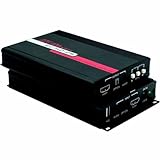
5. Gefen GTV-HDMI-2-HDMIAUD HDMI to HDMI Plus Audio Converter
When diving into the realm of audiovisual enhancements, it’s prudent to consider the Gefen GTV-HDMI-2-HDMIAUD HDMI to HDMI Plus Audio Converter.
This device is an HDMI audio de-embedder, not a video scaler.
It passes HDMI video through and extracts audio.
It does not upscale or downscale the picture.
The Gefen unit passes HDMI resolutions up to 1080p Full HD, including 1920×1200.
One of the main draws is its ability to de-embed audio from the HDMI stream.
The Gefen converter provides the following audio outputs:
- Digital bitstream on TOSLINK,
- Up to 7.1 LPCM on eight RCA jacks, not a single stereo pair.
The device also includes helpful features like:
- Lip-sync information passed through HDMI, not a separate delay control,
- Auto or manual EDID modes, so the source sees either the display’s EDID or a stored preset.
With HDCP compliance, protected HDMI sources can pass through to the display.
In corporate environments or home theaters, the Gefen ensures that protected material displays without a hitch and with top-notch audio quality.
With its compact design, the Gefen converter integrates into an existing AV setup without much fuss.
It does not require a vast amount of space and can sit comfortably alongside other equipment, maintaining a neat and efficient workspace or entertainment area.
Also, the Gefen GTV-HDMI-2-HDMIAUD supports a plug-and-play approach – minimal setup is required, allowing immediate use upon connection.
For both the AV enthusiast and the professional, the simplicity of operation makes this audio converter a practical breakout box.
It does not belong in a scaler shortlist if the job is changing resolution.

6. Roland V-1SDI 3G-SDI Video Switcher
As we venture further into the realm of video scalers, we can’t overlook the Roland V-1SDI 3G-SDI Video Switcher.
Known for its versatility, the V-1SDI is not just a video switcher but also a remarkable scaler, adept at handling professional 3G-SDI and HDMI inputs.
This device stands out with its key features –
- High-resolution support up to 1080p Full HD,
- Three 3G-SDI and two HDMI inputs,
- One HDMI and two 3G-SDI outputs.
These capabilities ensure that we can integrate a wide array of video sources.
The V-1SDI also boasts a user-friendly interface which makes it easy for us to manage and switch between different feeds without any lag or disruption.
Scaling sits on HDMI input 4, which accepts SD, HD, and PC rates up to 1920×1200 and converts them to the selected output format.
Inputs 1–3 have to match the 720p, 1080i, or 1080p format switch.
Input 3 is SDI or HDMI, not both at once.
The switcher’s performance is bolstered by features like frame rate conversion and interlace/progressive conversion.
These processes work seamlessly, delivering crisp, clear visuals irrespective of the original source quality.
Also, the V-1SDI comes equipped with advanced audio mixing capabilities.
It means we can mix audio signals from the SDI and HDMI inputs, which can be incredibly useful for live event productions where audio management is just as crucial as video.
Finally, its compact size and robust design make the Roland V-1SDI a perfect fit for mobile setups.
Durable yet lightweight, it’s ideal for on-the-go productions where space and reliability are at a premium.
Understanding the Roland V-1SDI’s capabilities showcases our commitment to staying at the forefront of video technology.
We recognize the need for powerful, multi-functional devices that can handle diverse AV needs with finesse.
And while our exploration of video scalers continues, it’s devices like the V-1SDI that reaffirm our belief in the importance of adaptable, high-quality video management solutions.
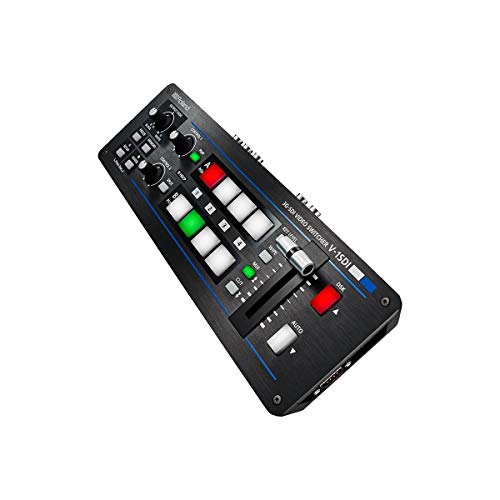
Roland
- 4-channel (video)/14-channel (audio) Digital Mixer with 3 SDI Inputs
- Transition Effects
- 2 HDMI Outputs
- Remote Access
- Compositing
4-channel (video)/14-channel (audio) Digital Mixer with 3 SDI Inputs Transition Effects
View on Amazon7. Avenview C-VGA-HDM VGA to HDMI Scaler
Moving on from the Roland V-1SDI, let’s jump into the Avenview C-VGA-HDM.
It’s a compact VGA-to-HDMI scaler.
Avenview rates the HDMI output at 720p/60 or 1080p/60, not 4K.
This means a VGA computer can feed an HDTV or projector at those two rates.
The Avenview scaler upscales VGA sources to 720p or 1080p.
It does not turn VGA into a 4K HDMI signal.
This versatility is crucial when we’re dealing with a mix of old and new technology hardware in our setups.
Not only is the video performance of this scaler commendable, but it also shines with its plug-and-play capability.
It’s easy for us to get it up and running quickly without the need for extensive configuration.
This ease of use is a significant advantage when time is of the essence during live events or presentations.
Key features of the Avenview C-VGA-HDM include:
- HDMI output limited to 720p/60 or 1080p/60,
- Clean and detailed image output ensuring content looks its best,
- Audio embedding from the analog stereo input to the HDMI signal.
Considering audio integration, the Avenview scaler embeds the analog audio signal into the HDMI output.
This synchronization of video and audio feeds dramatically simplifies the complexity of our system design.
It removes the need for separate audio routing which can be both cumbersome and time-consuming.
Examining our options for VGA-to-HDMI conversion, the Avenview C-VGA-HDM is a 1080p scaler, not a 4K processor.
Its ability to bring legacy VGA sources onto 720p or 1080p HDMI displays is the reason it stays on the list.

8. Barco Imagepro-ii All-in-one Video Scaler, Scan Converter, And Switcher
When we search for a versatile video processing tool, the Barco ImagePRO-II sticks out as an industry favorite.
Its robust construction and wide range of features make it a go-to for professionals who need a reliable all-in-one device.
The ImagePRO-II is renowned for its exceptional versatility.
It handles tasks from scaling and conversion to switching with unparalleled ease.
Key Features of the Barco ImagePRO-II include:
- Multiple video input formats – ensuring compatibility with various sources,
- Outputs up to 4K@30p on dual-link DVI and DisplayPort – HDMI on this unit is not a 4K output,
- A user-friendly interface – that allows quick navigation through its functions,
- Real-time processing – to deliver seamless transitions between inputs.

Charge what you’re worth — and hear “yes” more often
Positioning and follow-up tactics from the Get More Video Clients guide so you stop under-quoting and start winning work that fits your rates.
Professionals often praise the ImagePRO-II for its advanced processing capabilities.
These ensure the highest quality output for any screen or broadcast.
The sophisticated de-interlacing technology of the ImagePRO-II ensures that even interlaced video signals are converted smoothly.
You’ll appreciate the attention to detail in every frame.
The scaler’s ability to handle a range of aspect ratios is another reason it’s a favorite in our toolkit.
It adapts content from its original format to the desired display size without compromising quality.
Edge blending is not part of the ImagePRO-II.
Barco’s spec sheet lists mixers and layer effects as unavailable on this unit.
Coupled with its scaling features, the ImagePRO-II also doubles as a switcher.
It helps us manage multiple sources during live events with confidence.
Incorporating the Barco ImagePRO-II into our setup brings control and creativity to our projects.
Whether in a live production or a fixed installation, it stands out as a high performer.
The unit’s deep color processing ensures rich and vibrant colors across all types of content.
From corporate presentations to live concerts, our visuals remain impressive.
Its built-in Athena scaler is known for its world-class image quality.
We rely on the ImagePRO-II to maintain integrity and clarity of the original source material.
We’ll keep harnessing the power of the Barco ImagePRO-II.
It continues to play a pivotal role in delivering high-quality video outputs in diverse scenarios.
9. Datavideo DAC-70 Up/down/cross Converter
The Datavideo DAC-70 stands out for its flexibility, proving to be an essential tool for video scaling needs.
With its range of features, this converter makes transitions between various resolutions seamless.
It handles conversion with reliability, whether you’re upgrading or downgrading signal quality.
Supporting resolutions up to 1080p, the DAC-70 ensures your content meets current broadcasting standards.
Our focus on video quality is uncompromised, and the DAC-70 maintains this by offering the following:
- High-quality scaling options,
- Uncomplicated operation.
Real-time processing is critical during live productions, and the DAC-70 excels in this area. Latency is a non-issue with this device.
Connections are straightforward, thanks to the variety of inputs and outputs that include HDMI, SDI, and VGA.
This versatility makes the DAC-70 compatible with nearly all equipment.
Audio embedding is another key feature – allowing separate audio signals to be integrated into your video feed.
This is vital for professional productions where audio and video sources differ.
The DAC-70 is not just a converter; it’s a bridge between various video sources and resolutions.
It’s a tool that keeps you prepared for any eventuality in the ever-evolving video landscape.
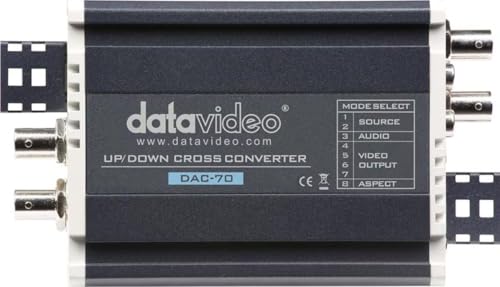
datavideo
- Audio/HDMI/SDI/VGA input
- 3G/HD/SD SDI and HDMI output
- Can be rackmounted using optional RMK-2 2RU Rack solution
Audio/HDMI/SDI/VGA input 3G/HD/SD SDI and HDMI output
View on Amazon10. Blackmagic Design Teranex Mini SDI to HDMI 12G Converter
Elevating the game further in the realm of video scaling, the Blackmagic Design Teranex Mini SDI to HDMI 12G Converter stands out for its high-end performance.
Its technological sophistication leads to nearly flawless video scaling.
This SDI-to-HDMI model downconverts Ultra HD for an HD HDMI display.
Upconversion belongs to the separate HDMI-to-SDI Teranex Mini.
It provides a range of features that make it indispensable for professionals who demand the best in video quality.
- HDMI 2.0 output up to 2160p60,
- One 12G-SDI input and one 12G-SDI loop output,
- Downconversion when the HDMI display cannot take Ultra HD.
With the Teranex Mini, compatibility is never a concern.
It offers a plethora of connections to HDMI 2.0 equipment and displays, ensuring that users can have their content on virtually any screen.
The SDI-to-HDMI model does not add optical fiber.
That connection belongs on the separate Optical to HDMI 12G.
Blackmagic’s published tools for this converter are the downconverter, a 33-point LUT, and audio de-embedding to balanced analog or AES/EBU.
The unit’s built-in downconverter keeps an Ultra HD SDI source viewable on an HD HDMI display.
Integrated audio processing is another highlight – de-embedding SDI audio to the XLR outputs, or leaving it in the HDMI signal, is the path this model actually offers.
Audio flexibility is crucial for comprehensive video processing, and the Teranex Mini excels here.
The Teranex Mini is built for durability and continuous operation.
With its intelligent thermal design and robust build, it can handle the grueling demands of live production environments.
Programming this converter is straightforward with its front panel interface or the downloadable software utility.
Users can make changes on the fly, a critical feature for live event handling.

Blackmagic Design
- 12G-SDI to HDMI Mini Video Converter with Audio De-embed Timecode Output
12G-SDI to HDMI Mini Video Converter with Audio De-embed Timecode Output
View on AmazonElevating Video Quality With Efficient Scalers
High-quality video scalers are pivotal for upgrading visual content to meet today’s standards.
In seeking the best video scalers, it’s crucial to focus on devices that support a multitude of resolutions and formats.
When we jump into the market, we find a plethora of options, yet not all scalers are created equal.
The most efficient ones provide users with versatility – handling various input and output signals without a hitch.
Features like frame rate conversion and aspect ratio adjustment are non-negotiable for any top-tier scaler.
They ensure that our footage meets broadcast specifications and looks great on any platform.
Among the industry leaders, the Blackmagic Design Teranex Mini SDI to HDMI 12G Converter stands out for its prowess in video scaling.
It elevates video quality through:
- Downconversion from Ultra HD SDI to an HD HDMI display,
- A 33-point LUT,
- Audio de-embedding to balanced analog or AES/EBU.
Our experience has shown that the best scalers also focus on audio quality.
Integrated audio processing is a key feature, enabling us to embed or de-embed audio signals with ease.
As we continue to review converters and scalers, it’s apparent that continuous operation durability is a significant factor.
Devices that can withstand the rigors of live production are the ones we trust for reliable performance.
To keep our content cutting-edge, we also look for converters like the Teranex Mini that are firmware-upgradeable.
It’s an assurance that our equipment will stay relevant as technology evolves.
Ensuring the visual integrity of our work demands equipment that can adapt to various display technologies.
Compatibility with the latest HDMI 2.0 standards is something we cannot overlook in a high-quality scaler.
Related on Filmmaking Lifestyle
Read next: Best LED Light Panels For Pro Video in 2026: 10 Top Picks To Find The Best For Your Shoot, Best Telephoto Lenses For Wildlife Capture in 2026: 11 Top Picks To Find Your Perfect Match, and Best Video Converters For Filmmakers in 2026: 10 Top Picks For Quality & Speed.
Top Video Scalers – Wrap Up
We’ve explored the vital role video scalers play in enhancing our visual experiences.
With the right scaler, like the Blackmagic Design Teranex Mini, we can ensure our content meets the highest quality standards.
It’s clear that investing in a device that offers a range of features and compatibility is key to achieving superior outputs.
Let’s make sure our visual content stands out by choosing a scaler that doesn’t just meet but exceeds our expectations.
Find the perfect gear for your next production.

10 Best Video Editing Tools for Beginners in 2026

Invideo Editor vs Veed: Which One in 2026?

How to Delete a Sentence From a Video by Editing the Transcript

10 Best Higgsfield Alternatives for AI Filmmaking in 2026

Best AI Tools for Making Microdramas in 2026

Best AI Tools for Storyboarding Before a Shoot

Invideo vs. Higgsfield: Which AI Filmmaking Platform Actually Delivers in 2026

AI Filmmaking in 2026: From Idea to Final Cut in One Connected Workflow
Best Video Editing Software for Freelance Videographers
New comments are not currently accepted.
Comments