
On this pageTap to expand
The Canon 5D Mark III has long been one of Canon’s best camera offerings. It’s a workhorse of a DSLR in many videographer (and photographer’s) bags.
With this article, we’re going to cover the best CF card for Canon 5D Mark III.
One of the best tools in a videographer’s chest, be they a newbie or a veteran is the Canon EOS 5D Mark III.
Though Canon has since produced updated versions of the EOS 5D, the 5D Mark III is still one of the best and easiest to use DSLR cameras in the market. Especially when paired with a good CF card.
The Importance of a Good CF Card
Of primary importance, whether you’re a videographer or photographer, is always storing and safely retaining what you shoot. People who “go cheap” with their memory cards invariably get burned.
A CompactFlash card is a flash memory mass storage device that was designed to be used in portable electronic devices. Also known as a CF card, they were first manufactured by SanDisk in 1994.1
The CF card remains a way to add storage on cameras that still use the format. The EOS 5D Mark III takes CompactFlash Type I cards, including UDMA 7, plus SD, SDHC, and SDXC cards.2 It does not take CFast or CFexpress cards, and those will not fit either slot. Movie options on this body are 1,920 x 1,080, 1,280 x 720, and 640 x 480, not 4K.2 Canon’s own movie guidance asks for a CF card that can write at least 10 MB/s for IPB and at least 30 MB/s for ALL-I.2
Let’s take a look at some of the best on the market.
Best CF Card for Canon 5D Mark III
In no particular order, here are seven CompactFlash cards that fit the 5D Mark III:
1. Lexar Professional
The Lexar Professional CF memory card has some of the fastest write speeds and read speeds available in the market right now. The minimum write speed for the Lexar Professional is 65 MB per second and its maximum write speed is 155 MB per second.
The Lexar Professional can capture 1080p full-HD video and even 3D and 4K video on cameras that record those formats. The 5D Mark III stops at 1080p, so that 4K line does not apply to this body. It comes with a Video Performance Guarantee (VPG-65) specification, a sustained write of at least 65 MB/s, so you can be sure of always capturing and storing high-quality video on a compatible camera.3
The Lexar Professional 1066x has been sold in 32 GB, 64 GB, 128 GB, and 256 GB.3 The difference between the Lexar CF cards depends on the amount of storage space that the card has. The CF card you should choose depends on the amount of storage space you need.
The price of the CF card will also vary according to the storage space. So, your budget is yet another consideration when deciding which of the different versions should be the one for you.

Lexar
- High speed performance, leverages UDMA 7 technology to deliver a read transfer speed up to 1066x (160MB/s)
- Captures high-quality images and extended lengths of stunning 1080p full-HD, 3D, and 4K video with a DSLR camera, HD camcorder, or 3D camera
High speed performance, leverages UDMA 7 technology to deliver a read transfer speed up to 1066x (160MB/s) Captures high-quality images and extended lengths of stunning 1080p full-HD, 3D, and 4K video with a DSLR camera, HD camcorder, or 3D camera
View on Amazon2. SanDisk Extreme Pro
The SanDisk Extreme Pro is another fast and reliable CF card to use when shooting video. It has a minimum write speed of 65 MB per second and a maximum write speed of 150 MB per second.4 Its maximum read speed is 160 MB per second.4 That 65 MB/s figure is the sustained write floor, not an average read speed.
With the SanDisk Extreme Pro, you get a Video Performance Guarantee for recording in high frame rates. This includes both 4K and HD.
The SanDisk Extreme is also one of the most durable CF cards available on the market today. It is designed to perform under high temperatures.
SanDisk specifically designed the Extreme Pro to work in “extreme” temperatures. It is rated as capable of performing in temperatures ranging from -13 to 185 degrees Fahrenheit.4
SanDisk Extreme Pro CompactFlash cards have been sold in several capacities, including 16 GB, 32 GB, 64 GB, 128 GB, and 256 GB. The price of the card that you decide to get depends on the storage space.
As we’ve mentioned here on Filmmaking Lifestyle in the past, putting your footage on a card bigger than 64 GB is incredibly risky. If you’re shooting anything less than 4K, putting your footage on 64 GB cards is akin to “putting all your eggs in one basket.”

Sandisk
- Records and captures cinema quality 4K and Full HD video(1)
- Video Performance Guarantee (VPG-65) delivers a minimum sustained write speed of 65MB/sec(2)
- Increase workflow efficiency with transfer speed of up to 160MB/s* (1067X) read speeds. Based on internal testing; performance may vary. MB=1,000,000 bytes. X = 150KB/sec.
- Industry leading shot speed performance of up to 150MB/s (1000X) write speeds. Based on internal testing; performance may vary. MB=1,000,000 bytes. X = 150KB/sec.
- Includes a lifetime limited warranty(3) and one year RescuePRO media recovery software download offer(4)
Records and captures cinema quality 4K and Full HD video(1) Video Performance Guarantee (VPG-65) delivers a minimum sustained write speed of 65MB/sec(2)
View on AmazonWhat Are CF Cards?
CF cards are a type of memory card that has been around since the 1990s and is used in digital cameras and other electronic devices.

Win corporate & branded work you actually want
How to sound credible to marketing teams and ops leads — pulled from the Get More Video Clients guide’s positioning and outreach sections.
CF stands for CompactFlash. SanDisk introduced the format in 1994.1 CompactFlash is a trademark of the CompactFlash Association.
Used in digital cameras, camcorders, and other computer devices, these cards can be used to store data such as pictures or videos.
A CF card moves files to a computer through a card reader. Standard CompactFlash cards do not connect over WiFi.
Often used in professional cameras, they come in a variety of different sizes to meet your needs.
If you’re looking for a way to store video or photos professionally, or just want something more reliable than an SD card, then CF cards might be perfect for you!
3. Transcend Ultimate 1000x
The Transcend Ultimate 1000x UDMA uses UDMA technology to get a 1000x speed rating. This enables it to get maximum read speeds of 160 MB per second and maximum write speeds of 70 MB per second.
This CF card has a Video Performance Guarantee (VPG-20) so you are sure of capturing and storing professional quality video in full HD. The card also has built-in ECC technology which detects and corrects errors.
There are four different versions of the Transcend Ultimate 1000x according to the amount of storage space that the card can provide.
The prices of the different Transcend Ultimate 1000x CF cards vary according to storage space.
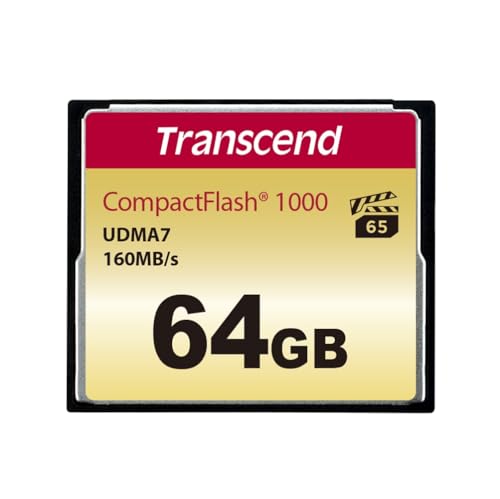
Transcend
- Ultra-fast 1000X performance, 160MB/s read and 120MB/s write , with four-channel support
- Built-in BCH ECC technology with read-retry for detecting and correcting errors
- Compliant with CF 6.0 specification with LBA48 support
- Ultra DMA Mode 0 to Ultra DMA Mode 7
- Multiword DMA Mode 0 to Multiword DMA Mode 4
- PIO Mode 0 to PIO Mode 6
Ultra-fast 1000X performance, 160MB/s read and 120MB/s write , with four-channel support Built-in BCH ECC technology with read-retry for detecting and correcting errors
View on Amazon4. Komputerbay 1066x CompactFlash Card
The Komputerbay Professional CF Card uses UDMA 7 to ensure high speed data transfer. With this CF card, you get a maximum write speed of about 155 MB per second and a maximum read speed of 160 MB per second.
There are four different varieties of the Komputerbay 1066x CompactFlash card available. The cards vary according to the amount of storage space that they have. The 32GB card linked below (KB_32GB_COMPACTFLASH_1066X) was unavailable on Amazon when this was checked, so confirm it is in stock.
Lexar
- High speed performance, leverages UDMA 7 technology to deliver a read transfer speed up to 1066x (160MB/s)
- Captures high-quality images and extended lengths of stunning 1080p full-HD, 3D, and 4K video with a DSLR camera, HD camcorder, or 3D camera
High speed performance, leverages UDMA 7 technology to deliver a read transfer speed up to 1066x (160MB/s) Captures high-quality images and extended lengths of stunning 1080p full-HD, 3D, and 4K video with a DSLR camera, HD camcorder, or 3D camera
View on Amazon5. Delkin 1000x UDMA7
This compact flash card is UDMA7 compliant, which gives it a 1000x speed rating. The 16GB Delkin 1000x (DDCFCOMBAT1000-16GB) is rated at 150 MB per second read and 50 MB per second write.
It also has a Video Performance Guarantee, which allows it to capture high quality images and video footage.
Delkin says the 1000x will not drop frames or slow the camera’s buffer, even under demanding shooting conditions.
The card linked here is that 16GB 1000x. A 32GB Delkin card sold separately is the 700x model, which is a different, slower card.
Advantages Of Using CF Cards
• A fast way to transfer data.
• Great for filmmakers and other creative professionals who need a lot of large files.
• Never run out of storage with the high capacity ones at 64, 128, and 256 GB.
• Efficient and cost-effective.
• Rugged material and construction.
• Secure.
Angelbird AV Pro CF: Reliability Meets Speed
The listing in the box is an Angelbird AV PRO SE CFexpress Type B card. It does not fit the 5D Mark III, which takes CompactFlash Type I and SD cards only.

6. Silicon Power Superior CF 1000X: Lightning-Fast Performance
The Silicon Power Superior CF 1000X is a CompactFlash card with UDMA 7, so it fits the 5D Mark III.
Silicon Power rates it at up to 150 MB/s read and 80 MB/s write, with VPG-20 (a guaranteed 20 MB/s sustained write).5 Canon wants at least 30 MB/s for ALL-I on this camera, and VPG-20 does not promise that, even though the peak write figure is higher. The 5D Mark III does not record 4K.
This card's UDMA7 support ensures smooth data transfer, while its durability protects your footage in various environments.
Whether you're shooting in the great outdoors or a controlled studio setting, the Superior CF 1000X ensures your camera operates at its best.
The linked listing is the 16GB version (SP016GBCFC1K0V10). Silicon Power has also listed 32GB, 64GB, and 128GB.
7. PNY Elite Performance: Value and Speed Combined
The PNY Elite Performance CF card strikes a balance between value and speed.
It is a CompactFlash card with UDMA 7, which the 5D Mark III can use. A 64GB version has been listed at up to 100 MB/s read.
It offers impressive write speeds at a competitive price point, making it an attractive choice for enthusiasts and semi-professionals.
This card's UDMA7 support ensures quick data transfer, while its durability means it can handle the rigors of on-location shooting.
If you're looking for a reliable CF card that won't break the bank, the PNY Elite Performance is a solid option for your Canon 5D Mark III. Buy the CompactFlash version, not an SD card that uses a similar name.

Stop under-scoping jobs on the discovery call
The Discovery Call Checklist walks you through the questions that surface scope, budget, and timeline — before you send a quote you’ll regret.
CF Cards: What You Need To Know
CF cards use flash memory, so they draw less power than a mechanical hard drive. They may be small but they are powerful and much more rugged than some other storage solutions.
They are also thick, which means they are less prone to bending or breaking (as well as getting lost).
When it comes to storage size, you can find CF cards in sizes ranging from 4GB to 512GB. The size of the CF card will usually determine the price.
CF cards are slightly similar to SD cards. Both storage devices are small and compact and they are usually used by just slotting them into your camera. But CF cards are slightly thicker and are available with a bit more storage size than SD cards.
As such, they are tougher and harder to break. If you film a lot under outdoor or rugged circumstances, or are prone to just absentmindedly putting a storage device in your pocket, a CF card might last you longer than an SD card.
That’s why a lot of people prefer to use the CF card (and the more expensive CF memory cards) even with cameras that come with dual card slots for both SD cards and CF cards.
On the 5D Mark III, the CF slot is the faster of the two. Canon does not run that SD slot at UHS speeds,6 and it asks for a higher minimum write speed on CF than on SD for the same movie mode.2 A slow old CompactFlash card can still be slower than a current SD card in a newer camera.
The 5D Mark III and the CF Card: a Match Made in Heaven
Japanese imaging and optical product manufacturer Canon released their Canon EOS 5D Mark III in March of 2012.2 The EOS 5D Mark III, was released in time for and to commemorate both 25th anniversary of Canon’s EOS camera line and the 75th anniversary of the company itself.
The Canon EOS 5D Mark III is popular with professional videographers because of its great image quality as well as it’s sturdy but compact body.
With the 5D Mark III, you get both automatic and manual exposure control, audio levels control, single autofocus, timecode support, and audio monitoring.
The 5D Mark III also allows you to use both an internal or external microphone and has noise suppression features. So, if you’re shooting video interviews or other footage where capturing the voices of your subject is important, you can be sure of capturing clear sound.
The 5D Mark III captures video footage as .MOV files, using MPEG -4 AVC/H.264 encoding.2 It offers you three different video resolutions to choose from: 1,920 x 1,080, 1,280 x 720, and 640 x 480. With the 5D Mark III you can easily take clear, good quality video.
While the EOS 5D Mark III has dual card slots, allowing it to use both a CF card and an SD card, in this post we’ve focused on using a CF card with a Canon EOS 5D Mark III.
We’ve listed some of the best CF cards to use with a Canon EOS 5D Mark III. Take a look at both their specs and their prices and decide which CF card will suit your video storage use the best.
Best CF Card for Canon 5D Mark III – a Conclusion
So, there we have it – the CF cards that we consider the best CF card for Canon 5D Mark III.
As ever there are a number of considerations when you come to purchase anything digital. And This is even more true when it comes to CF cards. Here’s what to look out for:
- Consider your camera and model.
- Your budget.
- The format of the video footage.
- What you plan to do with the video footage.
- The system you’ll use to store and to edit your footage.
The above considerations go beyond just for use on the Canon 5D Mark III and impact any camera you’ll use in conjunction with a CF card.
We hope this article on the best CF card for Canon 5D Mark III has been instructive for you. Which model of CF card do you use / plan to use? Let us know in the comments just below.
We have Gear Buyer’s Guides on every type of Filmmaking Equipment!
Expert reviews on the cameras, lenses, and tools filmmakers trust.

AI B-Roll vs Stock Footage: What Should Filmmakers Use for Cutaways?

Best AI Video Editors You Can Control With ChatGPT (MCP) in 2026

Best Descript Alternatives for Podcast Editing in 2026

Best AI Rough Cut Tools for Video Editors in 2026

10 Best Video Editing Tools for Beginners in 2026

Invideo Editor vs Veed: Which One in 2026?

How to Delete a Sentence From a Video by Editing the Transcript

10 Best Higgsfield Alternatives for AI Filmmaking in 2026

Best AI Tools for Making Microdramas in 2026
Sources & References
- Tech Brief: SanDisk QuickFlow Technology. SanDisk / Western Digital. SanDisk. The O.G. of Imaging Media timeline entry for 1994. View source↩
+1
↩2 - EOS 5D Mark III - Canon Camera Museum. Canon. Specifications > Type > Recording media. View source↩
- Lexar Professional 1066x CompactFlash Card product sheet. Lexar. Lexar International. 2018-04-01. Product highlights / Capture professional-level video with VPG-65 support. View source↩
+1
↩2 - SanDisk Extreme PRO CompactFlash Memory Card. SanDisk. Industry-leading shot speed performance / footnote 4. View source↩
- Silicon Power Unleashes the Superior CF 1000X Professional CF Card. Silicon Power. TechPowerUp. 2012-09-19. Features list. View source↩
- What memory cards have been verified to work with this camera? (EOS 5D Mark III). Canon. Verified SD/SDHC/SDXC memory cards > REFERENCE. View source↩


New comments are not currently accepted.
10 comments